偶米工作室不断积累WordPress使用和二次开发经验,在此为大家奉献一个独家经验,就是为WordPress分类目录添加图像,注意这个图片是在后台添加的,即在仪表盘中为分类目录指定图像目录,不同于别人分享的“自定义WordPress分类图片”,两者区别在于,前者可以为分类指定任意图片,而网友的方法只能是限定于以“分类名称”或“别名”命名的图片,限制多多。使用我们的经验,可以为分类指定任何图片,不限图片地址、不限图片格式等等,功能多多哦。
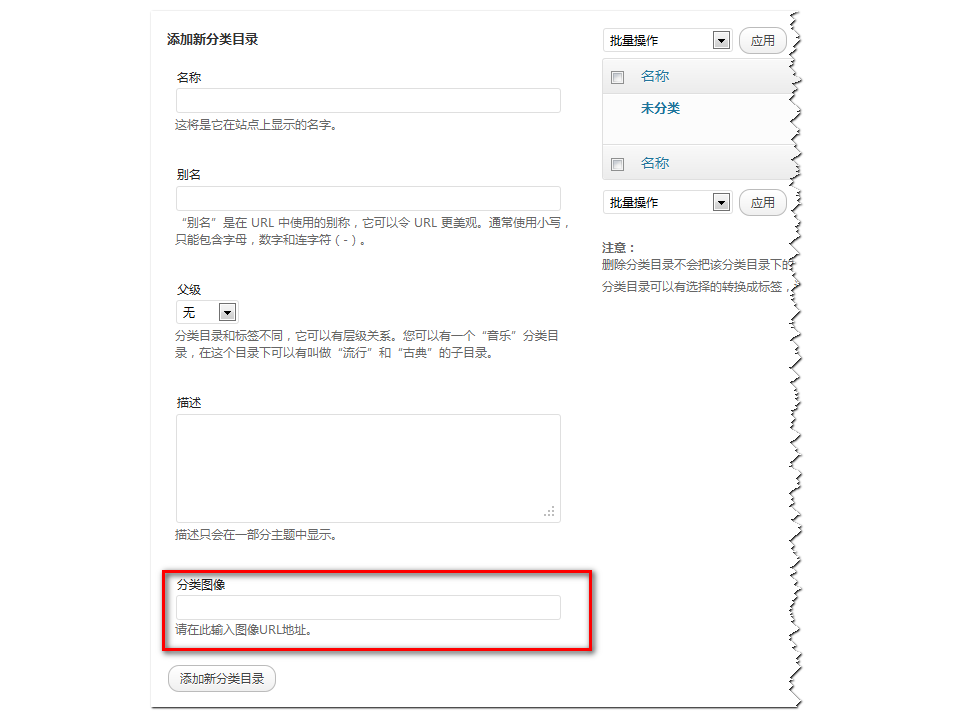
因为偶米工作室提供的功能可以为分类指定任意图片,因此这个图片的添加是在分类目录页面添加的,类似于文章的可视化自定义面板,我们为分类目录也添加自定义图片文本框,请将以下代码添加到WordPress企业主题的functions.php文件中:
<?php
global $texonomy_slug;
$texonomy_slug='category'; // texonomy slug
add_action($texonomy_slug.'_add_form_fields','categoryimage');
function categoryimage($taxonomy){ ?>
<div>
<label for="tag-image">分类图像</label>
<input type="text" name="tag-image" id="tag-image" value="" /><br /><span>请在此输入图像URL地址。</span>
</div>
<?php script_css(); }
add_action($texonomy_slug.'_edit_form_fields','categoryimageedit');
function categoryimageedit($taxonomy){ ?>
<tr>
<th scope="row" valign="top"><label for="tag-image">图像</label></th>
<td><input type="text" name="tag-image" id="tag-image" value="<?php echo get_option('_category_image'.$taxonomy->term_id); ?>" /><br /><span>请在此输入图像URL地址。</span></td>
</tr>
<?php script_css(); }
function script_css(){ ?>
<script type="text/javascript" src="<?php bloginfo('template_url'); ?>/js/category-image_thickbox.js"></script>
<link rel='stylesheet' id='thickbox-css' href='<?php echo includes_url(); ?>js/thickbox/thickbox.css' type='text/css' media='all' />
<script type="text/javascript">
jQuery(document).ready(function() {
var fileInput = '';
jQuery('#tag-image').live('click',
function() {
fileInput = jQuery('#tag-image');
tb_show('', 'media-upload.php?type=image&TB_iframe=true');
return false;
});
window.original_send_to_editor = window.send_to_editor;
window.send_to_editor = function(html) {
if (fileInput) {
fileurl = jQuery('img', html).attr('src');
if (!fileurl) {
fileurl = jQuery(html).attr('src');
}
jQuery(fileInput).val(fileurl);
tb_remove();
} else {
window.original_send_to_editor(html);
}
};
});
</script>
<?php }
//edit_$taxonomy
add_action('edit_term','categoryimagesave');
add_action('create_term','categoryimagesave');
function categoryimagesave($term_id){
if(isset($_POST['tag-image'])){
if(isset($_POST['tag-image']))
update_option('_category_image'.$term_id,$_POST['tag-image'] );
}
}
function print_image_function(){
$texonomy_slug='category';
$_terms = wp_get_post_terms(get_the_ID(),$texonomy_slug);
$_termsidlist=array();
$result = '';
foreach($_terms as $val){
$result .= '<div style="float:left; margin-right:2px;"><a href="'.get_term_link($val).'"><img height="22px" title="'.$val->name.'" alt="'.$val->name.'" src="'.get_option('_category_image'.$val->term_id).'" /></a></div>';
}
return $result;
}
add_shortcode('print-image','print_image_function');
?>
效果图如下:
独家经验:为 WordPress 分类目录添加个性化图像功能扩展
在需要显示分类目录的指定位置添加一下代码,我因为需要在页面循环显示所有的分类,因此使用以下foreach循环,大家可以根据需要进行修改:
<?php
$categories=get_categories($args);
foreach($categories as $category) {
    if ( get_option('_category_image'.$category->term_id) ){
            echo '<div><a href="'.get_term_link($category).'"><img title="'.$category->name.'" alt="'.$category->name.'" src="'.get_option('_category_image'.$category->term_id).'" /></a></div>';
    }
    echo '<div style=" text-align:center;"><a href="' . get_category_link( $category->term_id ) . '" title="' . sprintf( __( "View all posts in %s" ), $category->name ) . '" ' . '><b>' . $category->name.'</b></a></div>';
}?>
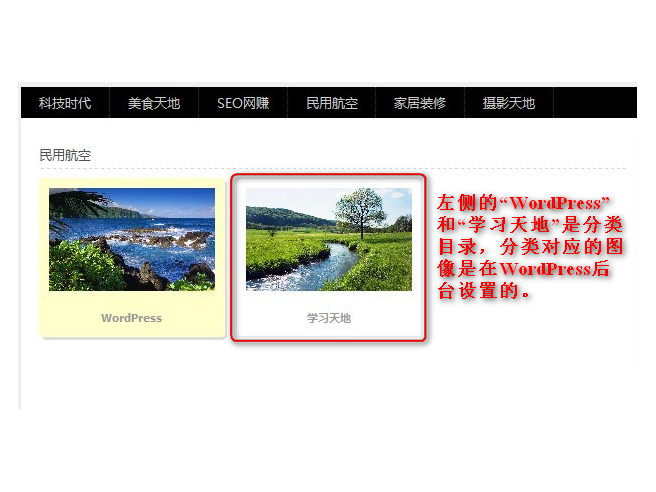
页面中同时显示分类和图像的效果如下,该效果大大丰富了网站的色彩,推荐大家使用。
独家经验:为 WordPress 分类目录添加个性化图像功能扩展